
If you are running multiple Expert Advisors (EAs) or distinct trading strategies on a single MetaTrader account, keeping track of performance can quickly become a nightmare. How do you know which strategy is pulling its weight and which one is dragging your account down? The secret lies in tracking Magic Numbers.
In this tutorial, we will break down the Magic Analytics Pro EA, a custom MQL5 utility that tracks, calculates, and displays the performance of every Magic Number on your account in real-time.
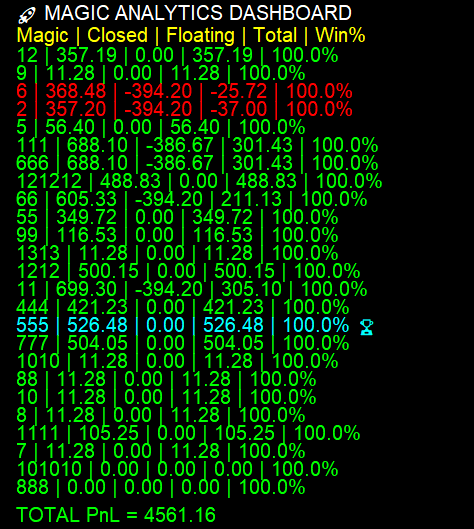
By the end of this guide, you will have a fully functional on-chart dashboard that displays closed profits, floating PnL, and win rates for each of your algorithmic strategies.
Why Track Magic Numbers?
A “Magic Number” is a unique identifier assigned to trades placed by an Expert Advisor. By filtering trades based on this ID, developers can separate the performance of one EA from another, even if they are trading the same currency pair.
Our custom dashboard will provide the following edge:
- Real-Time Analytics: Monitors closed and floating profits dynamically.
- Win Rate Calculation: Tracks wins versus losses to give you a percentage-based win rate for each strategy.
- Visual Highlights: Automatically identifies and highlights your best-performing strategy with a custom color and a trophy icon (🏆).
- On-Chart UI: Eliminates the need to dig through the MetaTrader terminal history.
Code Breakdown: How the Magic Analytics Pro EA Works
Before we get to the full script, let’s look at the core mechanics making this dashboard function seamlessly.
1. The Data Structure
To keep our data organized, the EA uses a custom struct called MagicStats. This structure acts as a container for each unique Magic Number, holding its specific closed profit, floating profit, win count, and loss count. As the EA discovers new Magic Numbers in your trade history, it dynamically resizes an array to accommodate them.
2. Real-Time Trade Tracking
Instead of looping through the entire account history on every tick (which is terrible for CPU performance), this EA uses the OnTradeTransaction event handler. It listens specifically for TRADE_TRANSACTION_DEAL_ADD events. When a trade closes, it instantly updates the closed_profit, wins, and losses for the corresponding Magic Number.
3. Floating PnL on a Timer
Because open trades change value constantly, we use the OnTimer() function set to refresh every 2 seconds. The UpdateFloatingPnL() function loops through all currently open positions, groups them by their Magic Number, and tallies up the floating profit.
4. The Visual Dashboard
The DrawDashboard() function is responsible for rendering the UI directly onto the chart using OBJ_LABEL graphical objects. It clears old text objects and redraws the updated statistics, applying conditional formatting:
- Lime Green: Profitable strategies.
- Red: Unprofitable strategies.
- Aqua: The single best-performing strategy currently running.
The Complete Source Code
Here is the complete MQL5 source code for the Magic Analytics Pro EA. You can copy and paste this directly into your MetaEditor, compile it, and attach it to any chart.
//+------------------------------------------------------------------+
//|                 MAGIC ANALYTICS PRO EA (FULL VERSION)            |
//+------------------------------------------------------------------+
#property strict

//-------------------- INPUTS --------------------//
input int Table_X = 20;
input int Table_Y = 40;
input int Refresh_Seconds = 2;

//-------------------- STRUCT --------------------//
struct MagicStats
{
   long magic;
   double closed_profit;
   double floating_profit;
   int wins;
   int losses;
};

//-------------------- GLOBALS --------------------//
MagicStats stats[];
datetime session_start;

//+------------------------------------------------------------------+
//| Expert Initialization                                            |
//+------------------------------------------------------------------+
int OnInit()
{
   session_start = TimeCurrent();   // Session start time
   EventSetTimer(Refresh_Seconds);
   return(INIT_SUCCEEDED);
}

//+------------------------------------------------------------------+
//| Expert Deinitialization                                          |
//+------------------------------------------------------------------+
void OnDeinit(const int reason)
{
   EventKillTimer();

   // Clean up all UI objects
   for(int i=ObjectsTotal(0); i>=0; i--)
   {
      string name = ObjectName(0,i);
      if(StringFind(name,"PRO_MAGIC_") == 0)
         ObjectDelete(0,name);
   }
}

//+------------------------------------------------------------------+
//| Get or Create Magic Index                                        |
//+------------------------------------------------------------------+
int GetMagicIndex(long magic)
{
   for(int i=0;i<ArraySize(stats);i++)
   {
      if(stats[i].magic == magic)
         return i;
   }

   int size = ArraySize(stats);
   ArrayResize(stats, size+1);

   stats[size].magic = magic;
   stats[size].closed_profit = 0;
   stats[size].floating_profit = 0;
   stats[size].wins = 0;
   stats[size].losses = 0;

   return size;
}

//+------------------------------------------------------------------+
//| REAL-TIME CLOSED TRADE TRACKING                                  |
//+------------------------------------------------------------------+
void OnTradeTransaction(const MqlTradeTransaction& trans,
                        const MqlTradeRequest& request,
                        const MqlTradeResult& result)
{
   if(trans.type != TRADE_TRANSACTION_DEAL_ADD)
      return;

   ulong deal = trans.deal;

   if(!HistoryDealSelect(deal))
      return;

   datetime deal_time = (datetime)HistoryDealGetInteger(deal, DEAL_TIME);

   // Ignore trades that occurred before the EA was attached
   if(deal_time < session_start)
      return;

   int type = (int)HistoryDealGetInteger(deal, DEAL_TYPE);

   // Ignore non-trading operations like balance/credit adjustments
   if(type > DEAL_TYPE_SELL)
      return;

   long magic = HistoryDealGetInteger(deal, DEAL_MAGIC);
   double profit = HistoryDealGetDouble(deal, DEAL_PROFIT);

   int index = GetMagicIndex(magic);

   stats[index].closed_profit += profit;

   if(profit >= 0)
      stats[index].wins++;
   else
      stats[index].losses++;
}

//+------------------------------------------------------------------+
//| FLOATING PnL CALCULATION                                         |
//+------------------------------------------------------------------+
void UpdateFloatingPnL()
{
   // Reset floating profits to zero before recalculating
   for(int i=0;i<ArraySize(stats);i++)
      stats[i].floating_profit = 0;

   int total = PositionsTotal();

   for(int i=0;i<total;i++)
   {
      ulong ticket = PositionGetTicket(i);
      if(!PositionSelectByTicket(ticket))
         continue;

      long magic = PositionGetInteger(POSITION_MAGIC);
      double profit = PositionGetDouble(POSITION_PROFIT);

      int index = GetMagicIndex(magic);
      stats[index].floating_profit += profit;
   }
}

//+------------------------------------------------------------------+
//| TIMER EVENT                                                      |
//+------------------------------------------------------------------+
void OnTimer()
{
   UpdateFloatingPnL();
   DrawDashboard();
}

//+------------------------------------------------------------------+
//| DRAW DASHBOARD UI                                                |
//+------------------------------------------------------------------+
void DrawDashboard()
{
   string name;

   // Clear previous text elements to prevent overlapping
   for(int i=ObjectsTotal(0); i>=0; i--)
   {
      name = ObjectName(0,i);
      if(StringFind(name,"PRO_MAGIC_") == 0)
         ObjectDelete(0,name);
   }

   int y = Table_Y;

   // Draw Header
   DrawText("PRO_MAGIC_HEADER","🚀 MAGIC ANALYTICS DASHBOARD",Table_X,y,clrWhite);
   y += 22;

   // Draw Columns
   DrawText("PRO_MAGIC_COL","Magic | Closed | Floating | Total | Win%",Table_X,y,clrYellow);
   y += 20;

   // Determine the Best Performer
   double bestProfit = -DBL_MAX;
   int bestIndex = -1;

   for(int i=0;i<ArraySize(stats);i++)
   {
      double total = stats[i].closed_profit + stats[i].floating_profit;

      if(total > bestProfit)
      {
         bestProfit = total;
         bestIndex = i;
      }
   }

   double grandTotal = 0;

   // Populate the Data Rows
   for(int i=0;i<ArraySize(stats);i++)
   {
      double total = stats[i].closed_profit + stats[i].floating_profit;

      int trades = stats[i].wins + stats[i].losses;
      double winrate = (trades > 0) ? (stats[i].wins * 100.0 / trades) : 0;

      string tag = (i == bestIndex) ? " 🏆" : "";

      string row =
         (string)stats[i].magic + " | " +
         DoubleToString(stats[i].closed_profit,2) + " | " +
         DoubleToString(stats[i].floating_profit,2) + " | " +
         DoubleToString(total,2) + " | " +
         DoubleToString(winrate,1) + "%" + tag;

      color col;

      if(i == bestIndex)
         col = clrAqua;
      else if(total >= 0)
         col = clrLime;
      else
         col = clrRed;

      DrawText("PRO_MAGIC_ROW_"+(string)i,row,Table_X,y,col);

      grandTotal += total;
      y += 18;
   }

   y += 10;

   // Draw Grand Total Line
   color totalColor = (grandTotal >= 0) ? clrLime : clrRed;

   DrawText("PRO_MAGIC_TOTAL",
            "TOTAL PnL = " + DoubleToString(grandTotal,2),
            Table_X,y,totalColor);
}

//+------------------------------------------------------------------+
//| UTILITY: DRAW TEXT FUNCTION                                      |
//+------------------------------------------------------------------+
void DrawText(string name,string text,int x,int y,color clr)
{
   ObjectCreate(0,name,OBJ_LABEL,0,0,0);
   ObjectSetInteger(0,name,OBJPROP_XDISTANCE,x);
   ObjectSetInteger(0,name,OBJPROP_YDISTANCE,y);
   ObjectSetInteger(0,name,OBJPROP_COLOR,clr);
   ObjectSetInteger(0,name,OBJPROP_FONTSIZE,10);
   ObjectSetInteger(0,name,OBJPROP_CORNER,CORNER_LEFT_UPPER);
   ObjectSetString(0,name,OBJPROP_TEXT,text);
}
//+------------------------------------------------------------------+
Conclusion
By utilizing event handlers like OnTradeTransaction and structs to cleanly organize your data, the Magic Analytics Pro EA serves as a highly efficient, lightweight tool for any serious algorithmic trader.
Attach it to an empty chart in your terminal, and let the dashboard do the heavy lifting of portfolio management for you.
Disclaimer: Trading foreign exchange on margin carries a high level of risk. The code provided in this article is for educational purposes and should be thoroughly tested on a demo account before being used in live trading environments.