
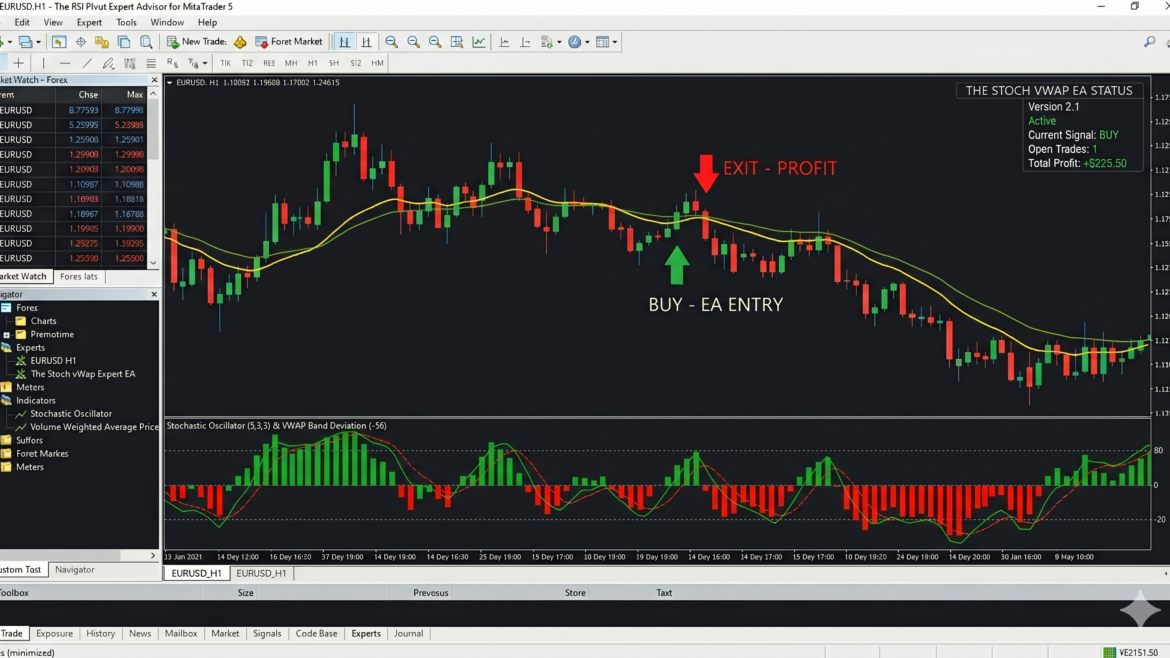

Algorithmic trading is only as good as the logic driving it. Many retail Expert Advisors (EAs) rely on static rules that fail when market conditions change. The StochvWap_EA, developed by Sandip R. Pawar and featured exclusively on appsportal.in, takes a fundamentally different approach. It is a dynamic, pro-level trading robot that adapts to volatility, strictly manages risk, and actively reads market momentum before executing a single trade.
If you want to understand how a professional MT5 algorithm actually processes data tick-by-tick, here is a complete breakdown of the StochvWap EA’s internal workflow.
(Remember : we are not claiming its profitable EA but user can make it from settings)
“Please note: We do not guarantee automated profits. The LakshmiG EA is a highly advanced, customizable tool; its performance depends entirely on how the user configures the settings and manages market risk. Practice with Demo Account First.”
When building an automated trading system, one of the biggest challenges is filtering out “market noise” to find high-probability setups. The StochParabolic EA tackles this by combining two of the most popular indicators in technical analysis: the Parabolic SAR (PSAR) and the Stochastic Oscillator.
Looking at the MQL5 initialization code, this Expert Advisor is designed to use a classic trend-following strategy with a precise momentum-based entry system. Here is a breakdown of how it works under the hood.
If the Parabolic SAR is excellent for riding pure price trends, adding volume to the equation introduces an entirely new dimension of market intelligence. By combining the Stochastic Oscillator with a Volume Weighted Average Price (VWAP), this new Expert Advisor aims to align short-term momentum with the true, volume-backed consensus of the market.
Here is a breakdown of how the inputs you provided shape the logic and mechanics of the Stoch-VWAP EA.
1. The Institutional Filter: 20-Period VWAP
The core trend direction is dictated by the VWAP, utilizing a rolling period:
- VWAP Period:
20
The Role: Unlike a standard Simple Moving Average (SMA) that treats all price data equally, the VWAP factors in trading volume. It shows where the majority of capital is flowing. A 20-period VWAP acts as a dynamic line in the sand:
- When the current price is above the 20-period VWAP, it means buyers are in control and the volume supports an uptrend.
- When the price is below the VWAP, it indicates that sellers have the upper hand.
By using VWAP as a baseline, the EA filters out “fakeouts”—price spikes that lack the trading volume required to sustain a true trend.
2. The Tactical Trigger: Stochastic Oscillator
Just like your previous EA, this system uses a fast and highly responsive Stochastic setup:
- %K Period:
5 - %D Period:
3 - Slowing:
3
The Role: The VWAP moves relatively slowly, which makes it a great trend identifier but a poor entry trigger. That is where the 5-3-3 Stochastic steps in. It rapidly measures short-term momentum, highlighting overbought conditions (above 80) and oversold conditions (below 20). It tells the EA exactly when to strike while the broader trend remains intact.
How the Strategy Comes Together
This EA operates on a classic “pullback” strategy, waiting for brief moments of weakness in a strong trend to execute trades. Here is how the two indicators lock together:
- The Buy Setup: First, the EA checks the VWAP. If the current price is firmly above the 20-period VWAP, the overall trend is bullish. The EA then waits patiently for the Stochastic to drop below 20 (oversold) and cross back upward. This means a short-term dip has exhausted its selling pressure, and it is time to buy back in the direction of the underlying volume.
- The Sell Setup: Conversely, if the price is below the 20-period VWAP, the market is bearish. The EA ignores all buy signals and waits for the Stochastic to rally above 80 (overbought) and cross downward. This signals that a temporary dead-cat bounce is over, providing an optimal short entry.
Conclusion
The beauty of the Stoch-VWAP EA lies in its balance. It uses the 20-period VWAP to ensure you are trading on the same side as the institutional volume, while leveraging the 5-3-3 Stochastic to pinpoint high-probability, low-risk entries. It is a highly logical, mechanical approach that waits for price and volume to perfectly align before risking capital in the markets.
1. The 2026 Daily Authentication Protocol
Before any market analysis occurs, the EA secures itself. To prevent unauthorized distribution and ensure users are running the most up-to-date version, the initialization phase (OnInit) runs a strict calendar validation.
- The system checks the current broker time against an internal master database hardcoded for the entire year of 2026.
- It requires a unique
InpDailyAuthKey(Magic Number) that rolls over every single day. Get it free from www.appsportal.in - If the user’s key does not match today’s or yesterday’s designated master key, the EA immediately aborts initialization.
2. Smart Auto Detection: Trending vs. Ranging
Once authenticated, the EA enters its core market-reading loop. The algorithm doesn’t just guess direction; it categorizes the current market regime using a dual-indicator “Smart Auto Mode.”
- Trend Strength (ADX): It calculates the 14-period Average Directional Index (ADX). If the ADX is below 20, the market is classified as lacking a strong trend.
- Momentum Extremes (WPR): It scans the 1-minute timeframe using the Williams %R oscillator. If the WPR drops below -80 (oversold) or spikes above -20 (overbought), it flags an extreme momentum state.
3. The useReversal Execution Engine
The data gathered from the Smart Auto Mode directly feeds into the system’s most crucial execution logic: the useReversal condition. This dictates exactly how orders are placed based on the previous candle’s High and Low, buffered by a custom step distance.
- Reversal Mode (Ranging Market): If the ADX indicates a weak trend, or WPR hits extreme levels,
useReversalbecomestrue. The EA anticipates that price will bounce off local extremes. It places Sell Limit orders above the current price and Buy Limit orders below the current price, catching the reversion to the mean. - Trend Mode (Breakout Market): If the market is trending smoothly,
useReversalisfalse. The EA swaps its strategy, deploying Sell Stop and Buy Stop orders to catch explosive breakouts as price pushes through previous highs and lows. - Volume & Spread Filters: Before any pending orders are finalized, the EA verifies that the 1-minute volume spike is healthy and that the live broker spread is within the maximum allowed limit (e.g., under 50 points).
4. Dynamic Risk Management (ATR & RR)
Static stop losses are highly vulnerable in volatile markets. The LakshmiG EA utilizes a dynamic, volatility-adjusted risk model.
- It calculates the true market volatility using a 14-period Average True Range (ATR).
- The Stop Loss (SL) distance is calculated by multiplying the ATR value (default 3.0x), ensuring the trade has enough room to breathe.
- The Take Profit (TP) is mathematically linked to the SL using a strict Risk-Reward Ratio (e.g., 1:1 or 1:2).
- The EA also provides pro-traders the flexibility to toggle
InpUseSLandInpUseTPcompletely off for alternative management strategies.
5. Advanced Trailing & Breakeven Protocol
Capital preservation is handled by an aggressive, multi-tier trailing stop function.
- The Breakeven Lock: Once a trade reaches a predefined profit threshold (e.g., 50 points), the EA automatically moves the stop loss to the entry price plus a small buffer (e.g., 12 points). This guarantees the winning trade cannot turn into a loss.
- Step Trailing: As the trade continues into profit, the EA trails the stop loss in fixed increments (e.g., every 100 points), locking in profits step-by-step as long as the trend survives.
6. The Visual Chart UI
Finally, the EA doesn’t leave the trader in the dark. It continuously updates an on-chart user interface that displays the live market mode (Ranging vs. Trending), real-time WPR status, volume changes, live spread health, and the exact point distances for the dynamic SL and TP. Furthermore, it actively draws and updates visual dash-lines directly on the MT5 chart, showing exactly where the dynamic SL and TP levels are currently resting.